Microsoft Warning
Microsoft Defender SmartScreen · Newly launched application
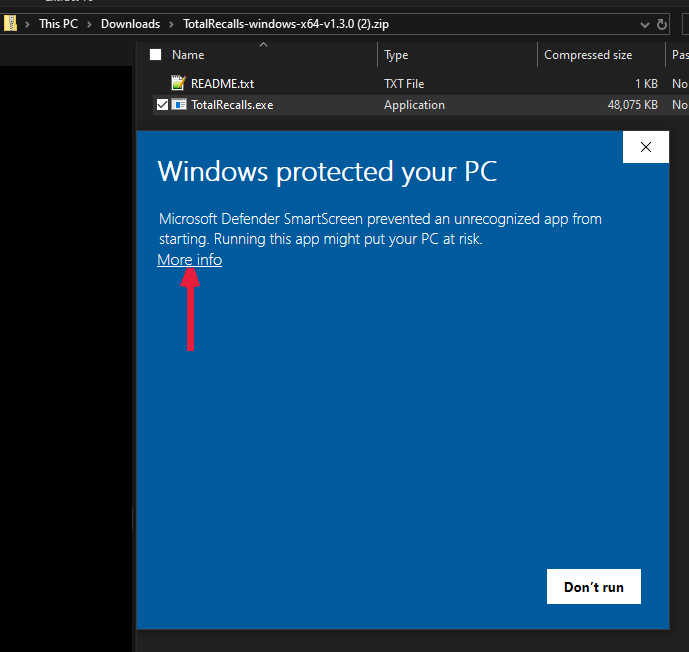
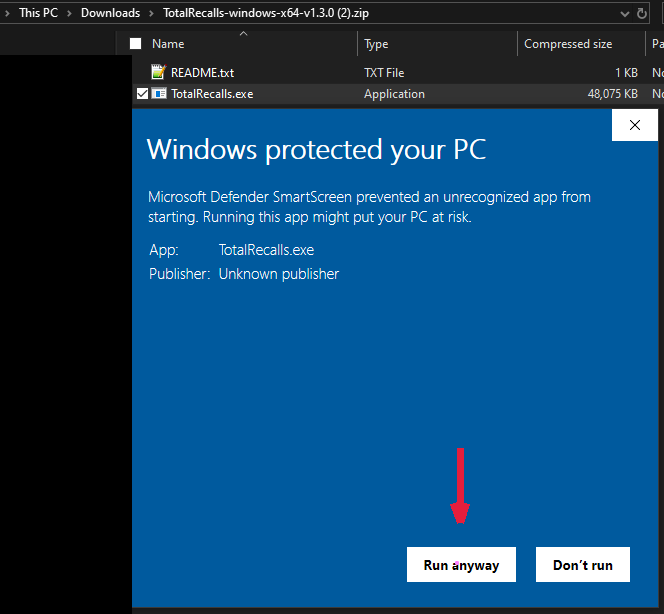
When you launch a newly released application or visit a new website, Microsoft Defender SmartScreen may display a warning stating “Windows protected your PC." This is an automated security measure designed to protect you from unfamiliar apps and sites but does not indicate the presence of malware or other threats.
Because TotalRecalls is a newly launched app, you might see this warning until our site gains more reputation with Microsoft. You can safely bypass this prompt to continue installing or running the app by following the steps below.
How to proceed safely:
- Click More info on the warning dialog to reveal additional options.
- Then click Run anyway to launch the application.
Please ensure you are downloading TotalRecalls only from our official website: totalrecalls.app. If you have any doubts or concerns, contact our support team at [email protected].