Recall every AI conversation.
A Windows app that downloads your ChatGPT, Claude, Perplexity, Gemini, Grok, DeepSeek, Mistral, and Qwen chats into a private folder of Markdown + JSON you keep forever — long after the tab closes and the UI changes.
Try the Free Tier today · One-time $24USD · No subscription
Private by design
Local sign-in · no cloud
One library
Every AI provider, one local folder
Yours forever
ChatGPT
OAI-001
Claude
ANT-002
Perplexity
PPL-003
Gemini
GEM-004
Grok
GRK-005
DeepSeek
DSK-006
Mistral
MST-007
Qwen Chat
QWN-008
C:\TotalRecalls
Library\
797 files · secured
From concern to ownership in a minute.
Simple as ABCD.
Buy once
Checkout via order processor. One-time $24USD, no subscription.
Install
Unzip and run the Windows app. Local sign-in only.
Pick your providers
ChatGPT, Claude, Perplexity, Gemini, Grok, DeepSeek, Mistral, or Qwen.
Download
Chats land as Markdown + JSON under your Library folder.
Eight AI providers. All in one library on your computer. Instant ownership.
ChatGPT
Direct Download
Claude
Direct Download
Perplexity
Direct Download
Gemini
Takeout → Markdown
Grok
Direct Download
DeepSeek
Direct Download
Mistral
Direct Download
Qwen
Direct Download
+
more features to come
New AI providers & capabilities in development
Your library, organized.
Clean folder structure you can browse, search, and back up.
Predictable formatting (.MD and .JSON formats) giving you the full flexibility to work with on your own tools.
# Pricing research
downloaded 2026-08-01 · provider: chatgpt · 14 messages
You: Compare one-time pricing for download tools.
Assistant: Here is a table of the options I found, with links and caveats…
+ attachments: sources.json
Watch a real download in action.
A short walkthrough of pulling a conversation out of a provider and saving it as Markdown + JSON on your own machine.
Demo footage of the Windows app. Your real conversations never leave your machine.
Reading.
No email gate · No AdSense
Download ChatGPT conversations
Official download vs a local library you can actually use
Download your Claude history
Keep Projects and long threads as files
Backup Perplexity threads
Save research threads before you lose the tab trail
Gemini Takeout → Markdown
Turn Google Takeout dumps into Markdown conversations
Download DeepSeek chats
Back up reasoning chains (R1 thinking traces) to local Markdown
Download Mistral (Le Chat) conversations
Back up EU chat history with UTF-8 fidelity
Download Qwen Chat conversations
Back up chat.qwen.ai history — never the DashScope API
Downloading Grok conversations
Save xAI Grok chats to local Markdown and JSON
Own your AI chat data
Why multi-assistant download matters in 2026
A standard, automated caution.
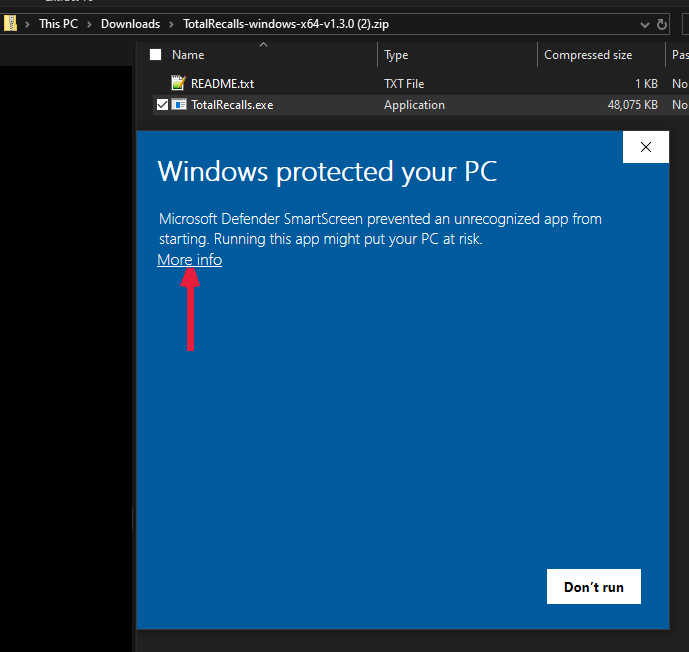
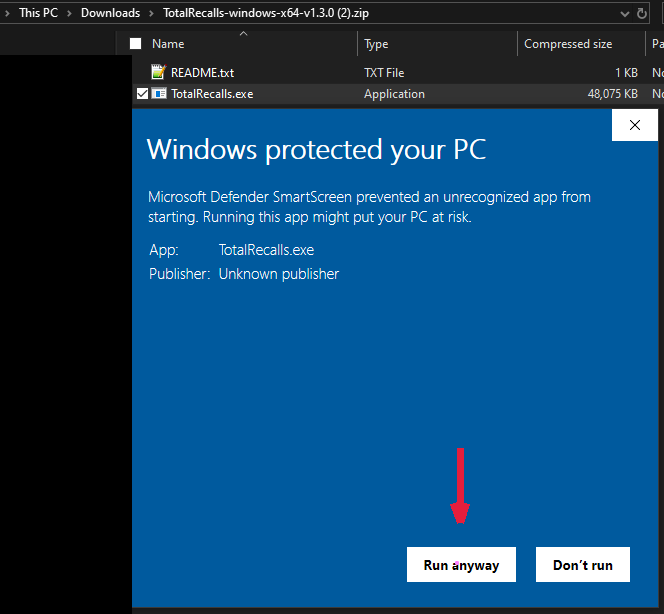
When you launch a newly released application or visit a new website, Microsoft Defender SmartScreen may display a warning stating "Windows protected your PC." This is an automated security measure designed to protect you from unfamiliar apps and sites but does not indicate the presence of malware or other threats.
Because TotalRecalls is a newly launched app, you might see this warning until our site gains more reputation with Microsoft. You can safely bypass this prompt to continue installing or running the app by following the steps below.
How to proceed safely:
- Click More info on the warning dialog to reveal additional options.
- Then click Run anyway to launch the application.
Please ensure you are downloading TotalRecalls only from our official website: totalrecalls.app. If you have any doubts or concerns, contact our support team at [email protected].
Your library travels with you.
No cloud account to lose, no proprietary format to be trapped in. Your conversations are ordinary files on your own machine — move them, back them up, or hand them to another tool without asking permission.
Own your files
Every conversation is saved on your own disk as Markdown + JSON. No account, no cloud library, no lock-in.
Open with anything
Plain, standard formats. Search them, back them up, diff them, or load them into any other tool you already use.
Move machines freely
Copy your download folder to a new PC and it just works. Your library follows you without a login.
Never uploaded
Everything runs locally. Your conversations never leave your machine.
This PC
- claude.md
- gpt.md
- perplexity.json
New PC
- deepseek.md
- gemini.json
- mistral.md
Copy the download folder — that's the whole migration.
One price. Every conversation. Yours forever.
Try it free first. The Free Tier lets you test the app on your own chats — limited to 3 AI providers and 5 conversations per download, so you can get comfortable before you pay. A one-time $24 purchase unlocks Pro: all 8 providers and unlimited downloads.
- ChatGPT
- Claude
- Perplexity
- Gemini
- Grok
- DeepSeek
- Mistral
- Qwen
- Windows 10/11 now. Linux and Apple apps are on the way.
- SmartScreen warning explained — what it means and how to proceed.
- No AdSense clutter. This site sells a tool, not pageviews.
Questions, answered.
A few things people ask before they download. Still curious? There's more on the FAQ page.
See all questions →Which providers does it work with?
Eight: ChatGPT, Claude, Perplexity, Gemini, Grok, DeepSeek, Mistral, and Qwen. One app downloads your conversations from all of them.
What's the refund policy?
We don't run a standard refund policy — we have better. A Free Tier is available so that you can test-drive the app before committing to buy it: download it and test it to your liking. The Free Tier has limited features — the goal is to make you comfortable with the product — so downloads are limited to only 3 providers and to only 5 conversations per download. The Pro version, a one-time launch purchase price of $24USD, unlocks all the features, expanding your downloads to the top 8 AI providers without limit on the number of conversations you can download. If you do have a refund request, contact us and we'll handle it on a case-by-case basis. Your statutory consumer rights — including the right of cancellation for online purchases that Quebec consumers enjoy — always apply and are never excluded.
Is there a subscription?
No. It's a one-time $24USD purchase — discounted launch price. You pay once and keep receiving free updates to the core app for the life of the product. New features (add-ons) are separate purchases; add-ons you own keep getting updates.
Do I need to create an account?
No. There's no account and no sign-up. Everything is saved locally as files on your own machine.
Is my data uploaded anywhere?
No. It runs 100% locally and never sends your conversations to a server.
Which platforms are supported?
Windows 10 and 11 today. The app is a portable desktop tool you download and run locally. Developing an application for Linux and Apple (macOS) is in the works.
Do I get updates?
Yes. The core app receives free updates for the life of the product — check the Release Notes on our website. New features (add-ons) will be developed on an ongoing basis and made available as separate purchases as we expand the product.