
Find anything you ever asked any AI.
Smart Search Engine (SSE) is an add-on for TotalRecalls Pro. It reads the Library on your PC, so you can search eight providers' conversations in plain English.
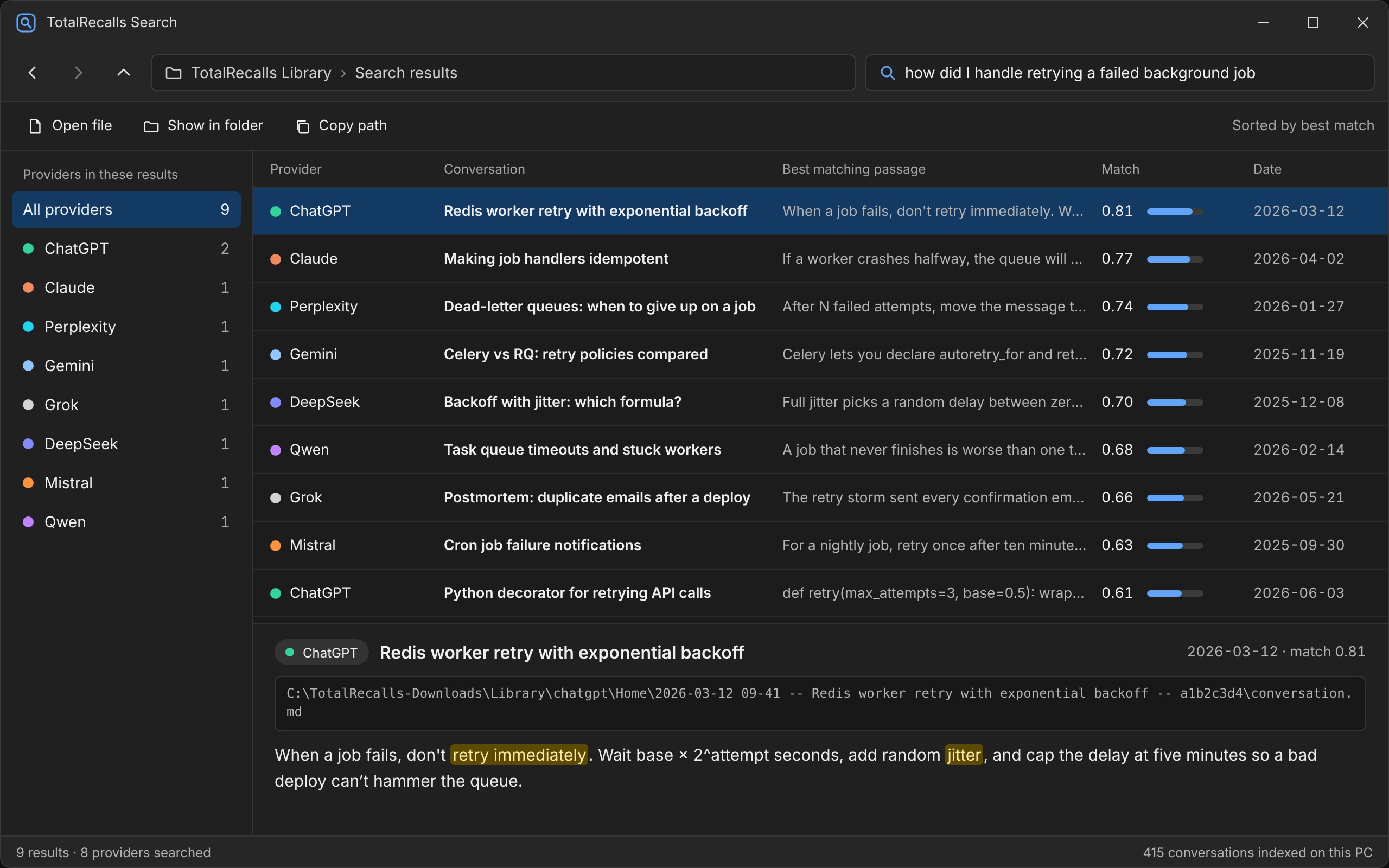
Smart Search Engine (SSE) results window — click a result to open the original conversation file.
You saved everything. Now you have hundreds of folders.
Folders named with dates and long IDs. Which one had the answer?
How it works
Setup takes a few minutes. After that, every new download is searchable.
Download with Pro
Your conversations land in one folder as Markdown and JSON files.
SSE reads the folder
It builds a private index on your PC, reading every conversation from all eight providers.
Ask
Type a question in plain English. See the matching passage, the provider, the conversation, and how close the match is. Click to open the file.
Three ways to search
| Mode | What it does | Use it when |
|---|---|---|
| Meaning (vector) | Finds passages that mean the same as your question | You don't remember the exact words |
| Keyword and meaning together (hybrid) | Adds exact-term matching for names, error codes and function names | You remember a specific term |
| Plain English to SQL | Turns a question into a database query | You want counts, dates and comparisons |
Smart Search Engine (SSE) results window — click a result to open the original conversation file.
What a Smart Search Engine (SSE) result shows
- Provider — which AI the conversation came from.
- Conversation title — so you know which chat it was.
- Best matching passage — with the key phrases highlighted.
- File location and match score — click to open the original Markdown or JSON file.
Private by design
- Smart Search Engine (SSE) runs on your PC.
- Nothing you write or save is uploaded.
- The search model downloads once at setup, so that step needs an internet connection. After that, Smart Search Engine (SSE) works without one.
- Chat works with no AI model at all. If you want written answers, you can connect a local model you already run.
Included at launch · Coming as paid upgrades
| At launch | Coming as paid upgrades (separate purchases) |
|---|---|
| Search by meaning, keyword or both | PII Scrubber: finds keys, tokens and emails in your chats so you can review them before sharing |
| Plain-English questions to SQL | Fine-tuning export (JSONL, Alpaca) |
| Chat with your archive | Consensus Auditor: compare what different AIs told you |
| Obsidian and Notion connections | Knowledge Graph: topic cards across providers |
| Automatic re-index | Embedding benchmark and cluster map |
Pricing
Two ways to buy. The bundle is the better value if you do not own the Downloader yet.
Smart Search Engine (SSE) add-on: $29 launch price (regular $58). One-time. Requires Downloader Pro.
Add SSE to Pro — $29 USDDownloader Pro + Smart Search Engine (SSE) bundle: $49 launch price (regular $98). Best value.
Get the bundle — $49 USDPrices may change at any time without advance notice.
Requirements
- TotalRecalls Pro
- Windows 10 or 11
- About 8 GB of RAM
- About 2 GB of free disk space
- No graphics card needed