
Watch a chat become files on your PC.
This page shows one complete download, recorded on a Windows PC. A conversation starts in the app and ends as two files in a folder on the drive.
One conversation, start to finish
Recorded on the Free Tier. Captions explain each step, so the video works with the sound off.
Real screen recording, trimmed for length. Account details are blurred.
Showing the current full walkthrough. The dedicated 60-second ChatGPT demo and the Pro upgrade walkthrough are in production — they drop into this slot when cut.
What happens in the video
0:00Open the app
TotalRecalls runs from its own folder on your PC. There's no installer and no TotalRecalls account.
0:08Choose your provider
The provider list shows what your tier includes. ChatGPT is part of the Free Tier.
0:15Sign in
You sign in inside the app, on your own PC. Your conversations aren't sent to our servers.
0:27Pick a conversation
Your history loads as a list. Select the conversation you want to keep.
0:36Download
TotalRecalls saves the conversation. A confirmation shows exactly where the files went.
0:45Open the Library folder
The chat sits in the provider subfolder as one Markdown file and one JSON file. The video ends with the file open.
What's on your drive afterward
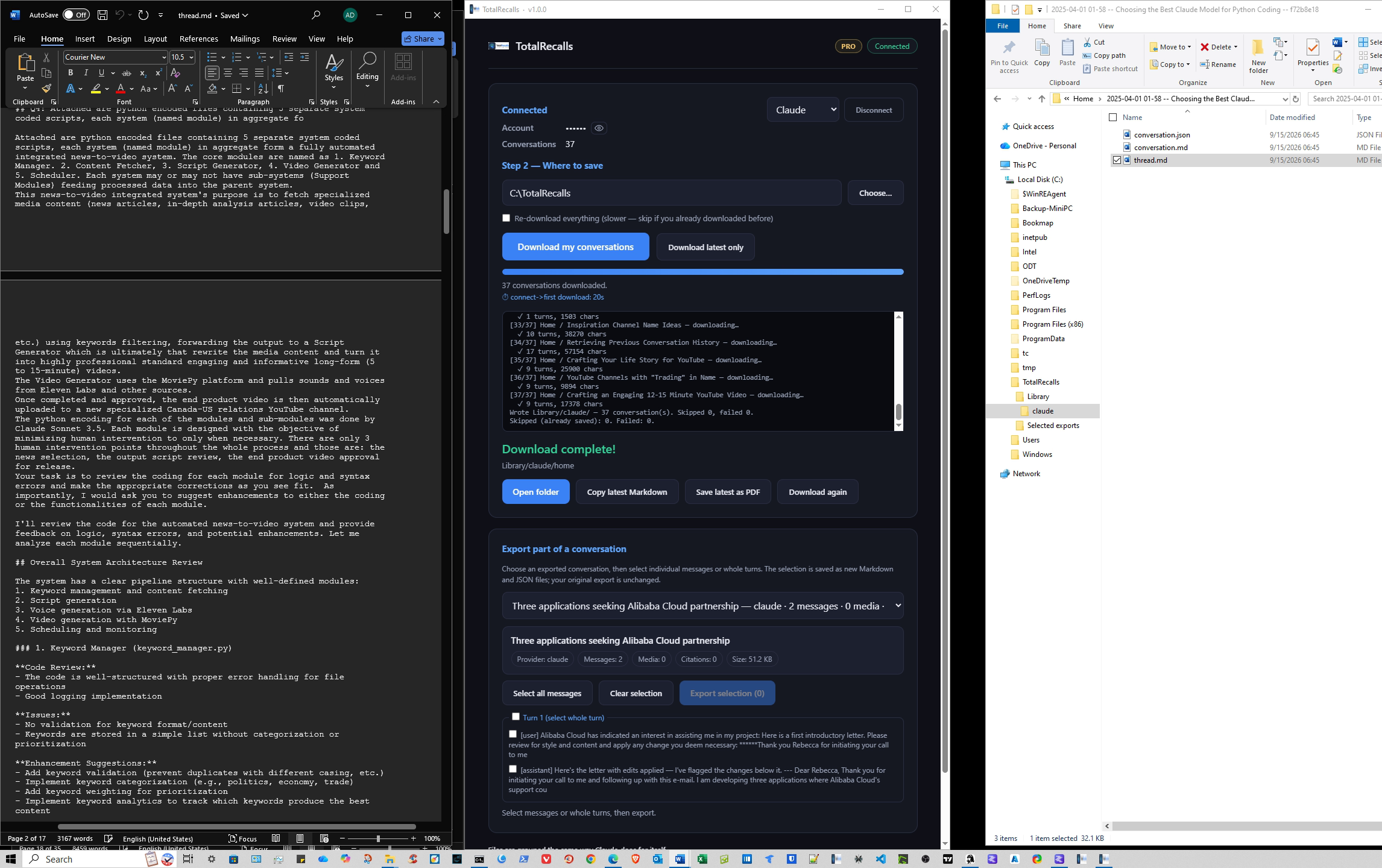
The folder
One Library, with a subfolder for each provider.
The Markdown file
The full conversation in readable text, with headings and code blocks intact.
The JSON file
The same chat as structured data, ready for search or other tools.
These files open without TotalRecalls. Copy them, back them up, or search them like any other document on your PC.
C:\TotalRecalls\Library\chatgpt\2026-09-14-pricing-research.mdMDJSON●Saved locallyRun the same download on your own chats
The Free Tier includes ChatGPT, Claude, and Perplexity, with up to 5 conversations each. You don't need a card or an account.
Windows 10 and 11. Windows may show a SmartScreen prompt the first time you open the app. What it means →
Want every provider and no download cap?
Compare Free and Pro →Show transcript
Final caption text lands here once the dedicated 60-second cut is locked. The caption track below follows the step-by-step above.
- 0:00 — Open the app. TotalRecalls runs from its own folder on your PC. There's no installer and no TotalRecalls account.
- 0:08 — Choose your provider. The provider list shows what your tier includes. ChatGPT is part of the Free Tier.
- 0:15 — Sign in. You sign in inside the app, on your own PC. Your conversations aren't sent to our servers.
- 0:27 — Pick a conversation. Your history loads as a list. Select the conversation you want to keep.
- 0:36 — Download. TotalRecalls saves the conversation. A confirmation shows exactly where the files went.
- 0:45 — Open the Library folder. The chat sits in the provider subfolder as one Markdown file and one JSON file. The video ends with the file open.